Filed Tax Return without Bank Account Info | Refund on Hold
April 02, 2026 by Jean Lee Scherkey, EA
I did not include my bank account information on my return. My refund check is now on hold. I have a bank account. What can I do to correct this problem?
-Zaul, Texas
Dear Zaul,
I feel your pain! Having your hard-earned refund placed on hold is no one’s idea of a happy, stress-free event, especially when we are all pinching our disappearing pennies. Due to Executive Order 14247, signed by President Trump on March 25, 2025, the IRS, in most situations, stopped issuing paper refund checks to individual taxpayers effective September 30, 2025. While the Executive Order stated that exceptions will be made under “specific circumstances,” the particulars have not been revealed. Where this leaves you and the millions of other taxpayers in this same situation is a bit confusing. Thankfully, tools and information are available to help you navigate the uncertainty and find the best path to your refund.
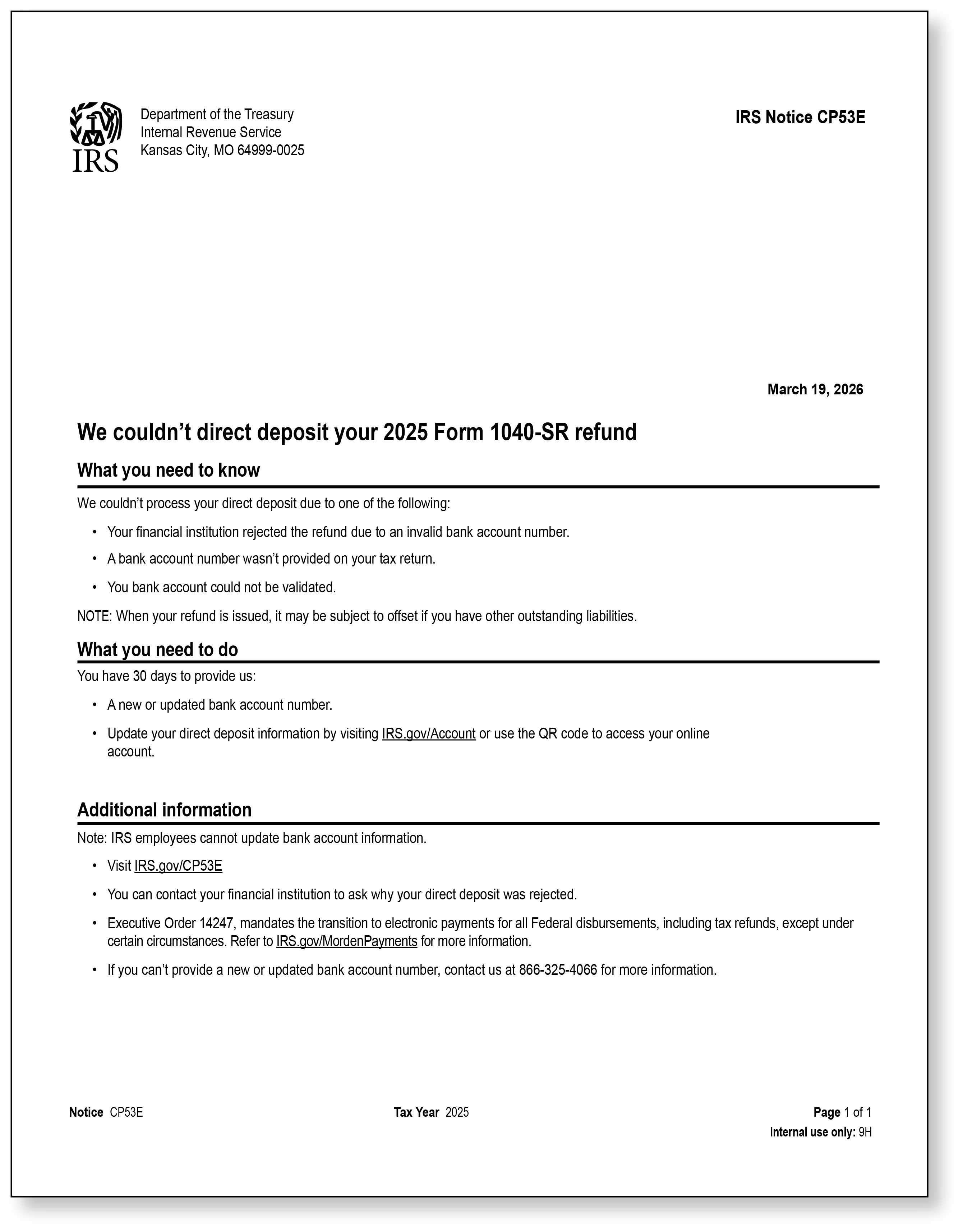
IRS Notice CP53E
Historically, when a taxpayer does not provide direct deposit information on their tax return, the IRS would assume the taxpayer is requesting a paper check and would timely issue the taxpayer’s refund by paper check. However, in response to the Executive Order, the IRS stopped issuing most paper checks. Beginning in 2026, the IRS will temporarily freeze refunds for taxpayers who have a refund on their 2025 Form 1040, Individual Income Tax Return, and who did not provide direct deposit information (routing and account numbers, and the type of account).
This is taking many taxpayers by surprise. If the taxpayer timely provides the direct deposit information, the IRS will unfreeze the refund and issue it via direct deposit. The IRS is notifying taxpayers who do not provide direct deposit information by sending Notice CP53E, We couldn’t direct deposit your 2025 Form 1040 (1040-SR) refund. Receiving this notice does not mean that the IRS has not processed their returns. The return has still been processed; however, the taxpayer’s refund is being held until more information is provided. Below are the scenarios in which the IRS issues Notice CP53E.
- The taxpayer’s financial institution (bank) rejected the refund due to an invalid account number.
- The taxpayer did not provide direct deposit banking information when they filed their return.
- The IRS could not validate the bank account the taxpayer provided.
If you received IRS Notice CP53E, time is of the essence!
Based on your question, it appears you have a bank account but did not include the information on your 2025 individual income tax return, Form 1040. If this is the case, you are likely to have received IRS Notice CP53E. If you have already received this notice, you must respond immediately to receive your refund promptly. To receive your refund in a timely manner, you only have 30 days to update or add your bank account information to your IRS online account.
The 30-day timeline starts from the date listed on the notice. For example, let’s say you received Notice CP53E on March 16, 2026. Day 1 of the 30 days is March 17, 2026, and day 30 will be April 15, 2026. As with all important deadlines, you may want to give yourself some breathing room and not wait until the last day to respond. You never know when fate may step in: your internet connection may temporarily go down, your child may have forgotten to tell you they have back-to-back soccer games, and you are the volunteer parent for both games, etc.
I need my refund quickly. How do I access my IRS online account and provide my bank account information?
If you already have an IRS online account and a bank account, you can log in to your IRS account at IRS.gov/Account and update your bank account information. Additionally, you can use the QR code on your notice to access your IRS online account. Modern technology has its perks and pitfalls, so there are times when the IRS online account system may not be working properly. If this happens, be sure to read the error message and follow any instructions.
I successfully updated my IRS online account. Now what happens?
Once you have added or updated your bank account information to your IRS online account, it will take the IRS approximately 2-5 days to update your account. According to the IRS, you should receive a message that your bank account information was updated.
Once your account is updated, you can use the online Where’s My Refund tool to check the status of your refund. In addition to the “Where’s My Refund” online tool, the IRS has a mobile app, IRS app, or you can call the automated refund hotline at 1-800-829-1954. No matter which way you access the tool, you will need to have the following information handy:
- Your Social Security number,
- Filing status listed on your return, and
- Exact whole dollar amount of your expected refund.
The “Where’s My Refund” tool reports the following:
- When your return is received
- When your refund is approved
- When your refund is sent
I do not have an IRS online account. How do I create one?
If you do not already have an IRS account, you will need to create one. Taxpayers may create an IRS online account by clicking here. Before you can establish your IRS online account, you will need to create an “ID.me” account. “ID.me” is often described as a secure, online, portable identification wallet that holds the specifics of your personal identity. Federal and state government agencies, as well as medical providers, use ID.me to securely verify a person's identity online, ensuring that the person accessing an online account is who they claim to be. The good news is that if you already have an ID.me account, it will work when setting up an IRS online account. You only need one ID.me account to access any government or medical online sites that use this technology.
If you do not have an ID.me account, you will first need to set up one before establishing your IRS online account. You can start the process of creating an ID.me account by logging in to the IRS’s Sign In or Create a New Account webpage.
When you initially set up your ID.me account, you will need to create an ID.me Wallet by entering your personal email and creating a unique password. To complete your ID.me account, you will need the following:
- A smartphone with a camera to take a selfie and take pictures of the required documentation that will be used to prove your identity. If needed, you can also use a computer that is connected to the internet. When using a smartphone, the phone number must be in your name. You cannot use someone else’s phone number or a landline.
- A photo ID, such as your U.S. driver’s license, a state ID, a U.S. passport, or a U.S. passport card
- A document that proves your Social Security number. This can be your actual Social Security card, your W-2, Form 1099, SSA-1099 Form, Form 1098, etc. If you have an Individual Taxpayer Identification Number (ITIN) instead of a Social Security number or only have a non-U.S. passport, please review the following ID.me webpage for further instructions: https://help.id.me/hc/en-us/articles/202211610-Providing-your-Social-Security-number-during-verification
For more information on how to sign in to your IRS online account using ID.me, please review the following webpage: https://help.id.me/hc/en-us/articles/4402761374231-Sign-in-to-the-IRS-with-ID-me-to-access-online-services.
What if I responded on time, adding or updating my bank account information online, but realized I had entered an old or inactive account, or the wrong account?
We all make mistakes. Perhaps you logged into your IRS online account and inadvertently entered an old checking account you closed a year ago, or you thought you entered the correct banking information, but lingered too long on the “5” key and entered two “5s” instead of one. Unfortunately, the IRS will not issue another Notice CP53E asking for new or updated banking information. Additionally, the IRS states in its Understanding Your CP53E Notice, Frequently Asked Questions, that taxpayers will have only one opportunity to add or update their banking information on their IRS online account. If the direct deposit information is rejected by the bank, or the IRS cannot validate the account number, the IRS states that a paper check will be issued sometime after 6 weeks.
We may want to pay close attention to the wording - sometime after 6 weeks. Many may interpret this to mean they will receive their check in about six weeks after the 30 days have expired. However, this may not be the case. Due to the DOGE budget cuts and personnel reductions, the IRS is not operating at full capacity. The IRS has been vague about how long it will take to process refund paper checks. It could take several weeks to months for taxpayers to receive their federal refund check by mail.
A word of caution regarding your bank rejecting your refund due to an invalid account number.
While the IRS will eventually issue a paper check to those who did not provide their account information or entered their account information incorrectly, the IRS will not automatically reissue a taxpayer’s refund via a paper check if the financial institution rejected the taxpayer’s account information. If your bank rejected your refund due to an invalid account number, it is very important that you do the following:
- Contact your bank to ensure you have the correct routing and account number. Some banks use different routing numbers for paper checks and direct deposit. So, if your bank uses a different routing number for direct deposit and other electronic transactions, and you entered the routing number for paper checks, it is possible your bank rejected the refund. This is only one reason your bank may have rejected your refund; there are others. It is important to understand why the refund was rejected and what you need to do to correct the issue.
- Once you determine why the bank rejected your refund and have the correct information, it is crucial to contact the IRS to resolve the issue so your refund will be reissued.
I’m not good with computers. Is there any way I can just call the IRS and provide my bank account information over the phone?
While IRS representatives are available by phone (1-800-829-1040), they are not permitted to add or update existing banking information on a taxpayer’s account. The only way a taxpayer can add or change their bank account information is through their online account.
What happens if I don’t respond in 30 days?
While some IRS notices allow taxpayers additional time to respond, CP53E does not. If you do not respond by the 30-day deadline, the IRS will issue your refund by paper check sometime after 6 weeks.
Additional Information
While you already have a bank account and are looking to find out how to provide this information to the IRS, there are other taxpayers who may not have a bank account or do not want to have their refund directly deposited into an account. You may even have a friend or relative in this position. Below is some additional information that may be helpful.
 What if I don’t have a bank account? Can I have my refund deposited directly onto a prepaid debit card?
If you have a financial mobile app or digital wallet, such as Apple Wallet, Google Wallet, or Samsung Pay, or a prepaid debit card with an assigned routing and account number, you may be able to deposit your refund directly here. You will want to confirm with the mobile app or the financial institution that administers the prepaid debit card whether there are associated routing and account numbers, and if they are considered “savings” or “checking” accounts.
Millions of taxpayers who do not currently have a bank account would like one. The reasons they don’t have one can vary, from living in a rural area without a local brick-and-mortar bank branch to not being able to afford the fees associated with setting up and maintaining a bank account. On its website, the IRS provides two links to low-cost or free banking options:
What if I don’t want my refund deposited directly?
There are many situations in which people may not want their refund deposited directly and prefer to receive a paper check. In addition to those who do not have a bank account, mobile app, digital wallet, or prepaid debit card, victims of domestic abuse, taxpayers with religious constraints that do not permit electronic financial transactions, and those with certain disabilities may require a paper check. Those who do not have direct deposit information or who have a reason why they need to receive their refund by paper check may request a paper check waiver through their IRS online account or by calling the main IRS phone number at 1-800-829-1040.
By not responding to Notice CP53E, your refund will be issued as a paper check. However, you may want to take the time to contact the IRS within the 30-day period and request a paper check waiver. According to the IRS, those who timely request a paper check will receive their refund faster than those who do not respond to the notice.
Why did I receive a Notice CP53E if my return had a balance due?
Every filed return undergoes a review process that matches the information on the return with the IRS's records from third-party sources, such as wages, investment income, and mortgage interest deductions. Certain errors are automatically adjusted. For instance, a taxpayer may forget to report on their 2025 tax return one of the estimated tax payments they made, resulting in a refund instead of a balance due. Because their originally filed return did not show a refund and therefore did not include direct deposit information, the taxpayer will receive a Notice CP53E requesting that they provide their bank account information.
Wrapping it all up
So far this tax season, the IRS has sent out over 830,000 Notice CP53E letters. According to the Taxpayer Advocate, over 10 million individual taxpayers received their 2024 refunds by paper check. Given this figure, it is likely that hundreds of thousands, if not millions, of additional CP53E notices will be sent to individuals who filed their 2025 return, are expecting a refund, and did not provide banking information for direct deposit. Given your question, I suspect you may be one of the individuals who received Notice CP53E. Thankfully, you have a bank account you can provide to the IRS. Your best chance to release your refund timely is to add your bank account information to your IRS online account as soon as possible, but no later than 30 days from the date listed on your Notice CP53E, if you received one. Because taxpayers are only given one opportunity to enter the account information correctly, you will want to check and then double-check your routing and account numbers and ensure you correctly identify whether the account is a checking or savings account.
Steps you can take if you find yourself in dire financial hardship
If it turns out you cannot have your refund directly deposited, and the delay of your refund check is causing considerable financial hardship to the point where you cannot pay your rent or mortgage, are in danger of having your utilities disconnected, or cannot afford your medications, you can try to call the main IRS phone number (1-800-829-1040) and request to a manual refund expedited to you due to financial hardship. More than likely, the IRS will request documentation of financial hardship, so you may want to have these documents ready to upload or fax to the IRS. The IRS may also request you fax or upload a copy of the return you submitted that shows the refund claim. If you are unable to get your refund issued immediately, we recommend contacting the Taxpayer Advocate Service. Their phone number is 1-877-777-4778. Because of the DOGE cuts, the Taxpayer Advocate Service is behind, so make sure you have all your information and documentation ready before you contact them. You can learn more about the Taxpayer Advocate Service by clicking here.
As we continue to live in challenging times, it is good to have as many options for help as possible. If you are unable to get the assistance you need from the IRS or the Taxpayer Advocate Service, one final alternative is to contact your local Congressional representative. Sometimes, Congress members have the resources to cut through the red tape and assist their constituents, especially when they are facing potentially dire circumstances. If you are not aware of who your representatives are, you can find out on Congress.gov.
Wishing you a speedy refund and many happy returns.
Jean Lee Scherkey, EA
Want peace of mind?

Jean Lee Scherkey, EA
Tax Content Developer